
Streamer tools,
duct-taped together.
Stream IRL without a PC.
Cloud OBS is built for IRL streamers. StreamWizard runs a dedicated OBS for your channel in the cloud, and your phone streams into it. When you want to go live, the only thing you need is your phone.
Your stream setup, already running
- A dedicated OBS for your channel, booted in the cloud when you need it.
- Your phone or encoder streams in over SRT or SRTLA.
- Signal drops mid stream? The auto switcher swaps to your connection-lost scene, tells chat, and swaps back when the bitrate recovers.
- Need eyes on OBS itself? Open the live OBS window in a browser on your PC, with CPU, memory, FPS, and frame time next to it.
--------------
Real footage from xpudu's IRL streams
Stream Deck
OBS ConnectedCurrent scene
IRL
Auto switching is on. Tap a scene to hold it.
Stream
The mobile deck runs the show
The deck lives on your phone and installs like an app. No PC, no tech BS, just stream. Switch a scene here and watch it land in the OBS window above.
- Go live and end the stream from your pocket.
- Switch scenes, or hold one while the auto switcher waits.
- Edit your stream title and category between locations.
- Read and send Twitch chat without leaving the deck.
Your own OBS stays yours. Cloud OBS is there for the streams your PC cannot follow.
Alerts, chat, clips, countdowns. One browser source.
Build the overlay in the editor, paste one URL into OBS. Starting screen, BRB, live: same widgets, your media.
Browser source · 1920×1080
The widget library
Title
{name} just followed!
Second line
Empty · hidden
Sound
chime-soft.mp3 · 80%
Alert box, every Twitch event
Follows, subs, cheers, raids, and the notices most alert tools skip: watch streaks, modiversaries, charity donations, bits badges, pay it forward. Each one gets its own media, sound, a title you write, and a second line for what the viewer typed. Test it from the editor before anyone shows up.
Clips rotator
Every clip from your channel, rotating on a BRB or starting screen. Pick a folder, a game, or shuffle all of them. Put the title, creator, and views where you want them.
Live GPS stats for IRL
Speed, distance, the city you are in, and the weather there, from the phone you stream from. No extra hardware. Latitude and longitude are in there too, so maybe do not dox yourself.
Countdowns, goals, and the subathon clock
Count down a break or to a set date and time, on a clock in your time zone. Follower and sub goals that fill while you stream. A subathon timer that gains time on every sub, cheer, and gift.
Custom widgets
HTML, JavaScript, and Tailwind, with a live preview while you type. Add settings fields so you tweak it without opening the code. Start from a starter or the public library.
A real editor
Layers, snapping, drag to resize, undo. Lock what should stay put. Fire fake follows and a simulated walk to test it before you go live.
Free and open source, like the rest of the dashboard.
More about overlaysEvery clip from your channel, organized.
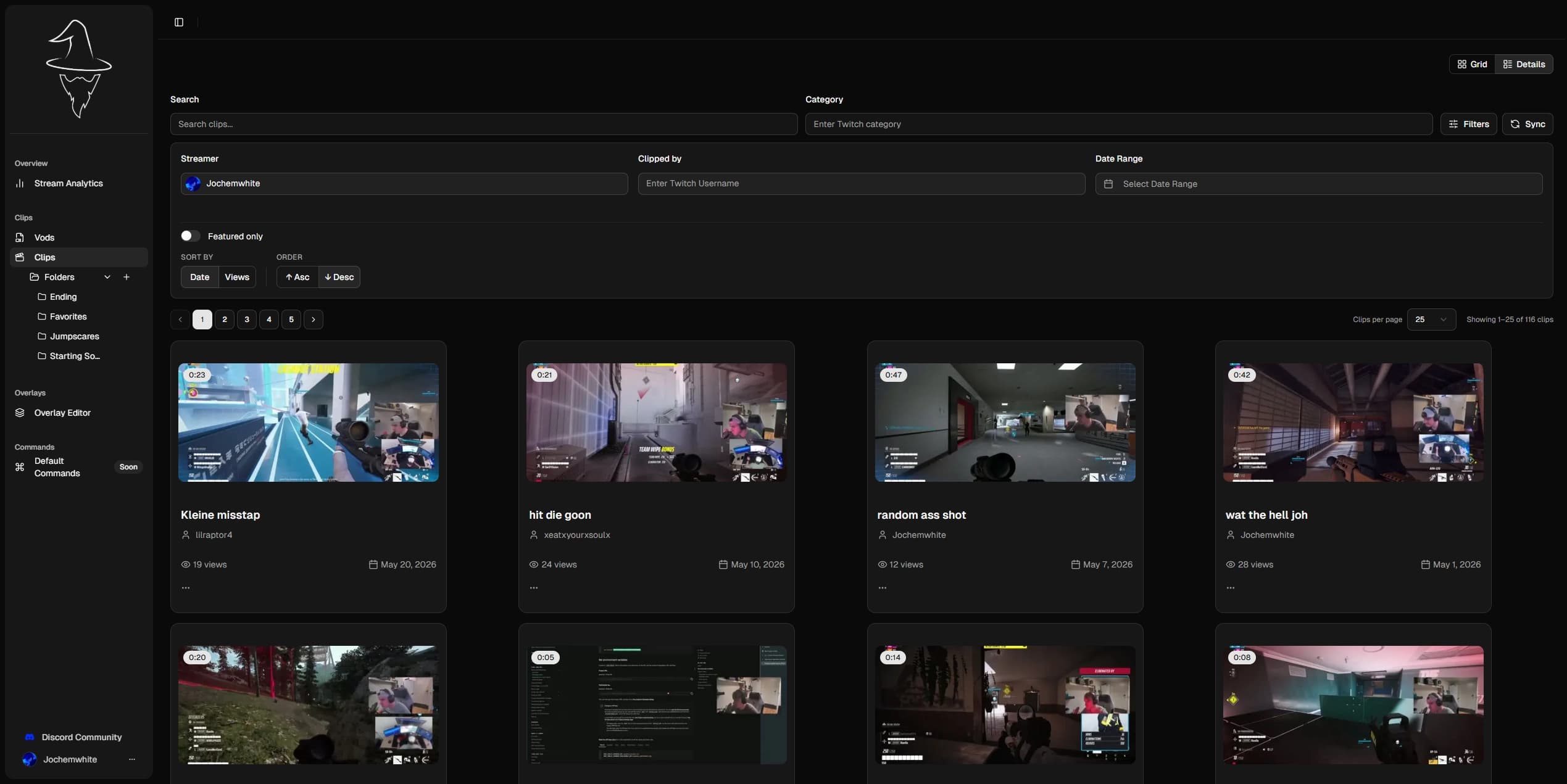
StreamWizard syncs every clip from your Twitch channel while you're live, with one last pass when you go offline. Search by title, filter by category or who clipped it, and file them into clip folders you create.
Showing 12 of 12 clips
 0:14
0:14pls help this would hit
 1:00
1:00PRIMONERO AGGREDITO
 0:54Featured
FREESTYLE PER PRIMO NERO
 0:12
0:12No shame
 0:15
0:15Pudu doet de griddy
 0:59
0:59BADDIEHUB
 0:08
0:08HAHAHAHA
 0:11
0:11Great song
 0:07
0:07Facecame
 0:30
0:30Final farewell forever stream in 2 days (!end). Quake 1
 0:29
0:29Hug the wall OH MA GAWD
 0:32Featured
CSDM / CFPL Games
Try it: filter, sort, or ⋮ then add to folder
Find it, then file it.
That is the clips page beside you, running on real clips. Filter down to the one you meant, then drop it in a folder from the clip's own menu. Go on, move one.
Folders you create
Name them by game, meme format, or vibe, and nest them as deep as you want. Twitch dumps every clip in one pile; you do not have to keep it that way.
File a clip in two clicks
Open a clip's menu, pick a folder, done. One clip can live in several folders, and Remove from folder takes it back out.
Filters that stack
Free text, category, who clipped it, date range, featured only. Sort by views or date, and every active filter shows as a chip you can drop.
Landscape and portrait
Download the portrait cut for Shorts and TikTok without opening an editor.
Real clips, synced by StreamWizard streamers
Nobody clipped it. Go get it anyway.
The best moment of the stream is the one chat was too busy to clip. Open the VOD, find it on the timeline, and cut it yourself.
Elden Ring blind run, day 6 (chat picked the build)
Elden Ring · 4h 12m · 1,842 views
2:10:00
Playhead position
Stream Events
27Try it: press play, Create Clip, drag the handles · Shift + scroll zooms
Four hours, one moment.
This is the VOD page on a real stream: 4h 12m, a raid at 2:10:00, three clips already cut out of it. The playhead is already sweeping. Drag a clip out of the timeline.
Every moment marked
Follows, subs, cheers, raids, ad breaks and muted audio all sit on the timeline. The raid you half remember is the indigo dot at 2:10:00.
Drag it out, 5 to 60 seconds
Open Create Clip, drag the handles, and the selection loops while you tune it. Name it, save it, and it lands back on the timeline as a clip.
Last stream, explained.
Your latest broadcast, minute by minute. Follows, subs, and clips land on the viewer graph, and the best hour gets called out.
Try turning it off.
4m 30s
214
137
4h 12m
14
5
| Category | Duration | Avg viewers | Peak viewers | Follows | Subs | Bits |
|---|---|---|---|---|---|---|
| Elden Ring | 2h 40m | 122 | 214 | 9 | 3 | 450 |
| Just Chatting | 1h 32m | 164 | 184 | 5 | 2 | 0 |
Starting out, the graph is mostly flat, and a rough night looks worse in a chart than it felt live. So the numbers are optional: we ask during setup, and it stays one switch in Settings. Turn it off and the analytics page goes away entirely, with your clips as the page you land on instead.
We start tracking the moment you go live, so this is your next stream, not your last one.
Questions, answered.
What it costs, what it touches, and what happens to the clips you already have.
Do I have to install anything?
Is it free?
What happens to the clips I already have?
How soon do I see my analytics?
I do not want to look at my numbers. Can I turn them off?
Why does Twitch ask for so many permissions?
Do I need to be an IRL streamer for this?
Something broke. Where do I go?
Do people actually ask these?
Sign in and poke around.
Log in with Twitch, no card needed. Clips, overlays, and analytics are free and open source.